Best AI Tools for Canadian Project Managers

Best AI Tools for Canadian Project Managers
Canadian project managers do not need a giant AI transformation program to get value from AI. They need a small, reliable tool stack that helps them plan faster, summarize messy information, reduce meeting drag, spot delivery risk, and keep stakeholders aligned without creating privacy or governance problems.
The best AI setup is not one magic assistant. It is a practical stack: one workspace tool, one delivery tool, one meeting/documentation assistant, one research assistant, and one automation layer. For most Canadian teams, the right answer starts with the tools they already use, then adds stricter rules for data, approvals, and cost.
Quick answer
The best AI tools for Canadian project managers are Microsoft Copilot for Microsoft 365, Atlassian Intelligence, Asana AI, ClickUp AI, Notion AI, and one approved reasoning assistant such as ChatGPT Team, Gemini, or Claude. The right choice depends on where the project work already lives: Microsoft 365, Jira, Asana, ClickUp, or Notion.
Advertisement
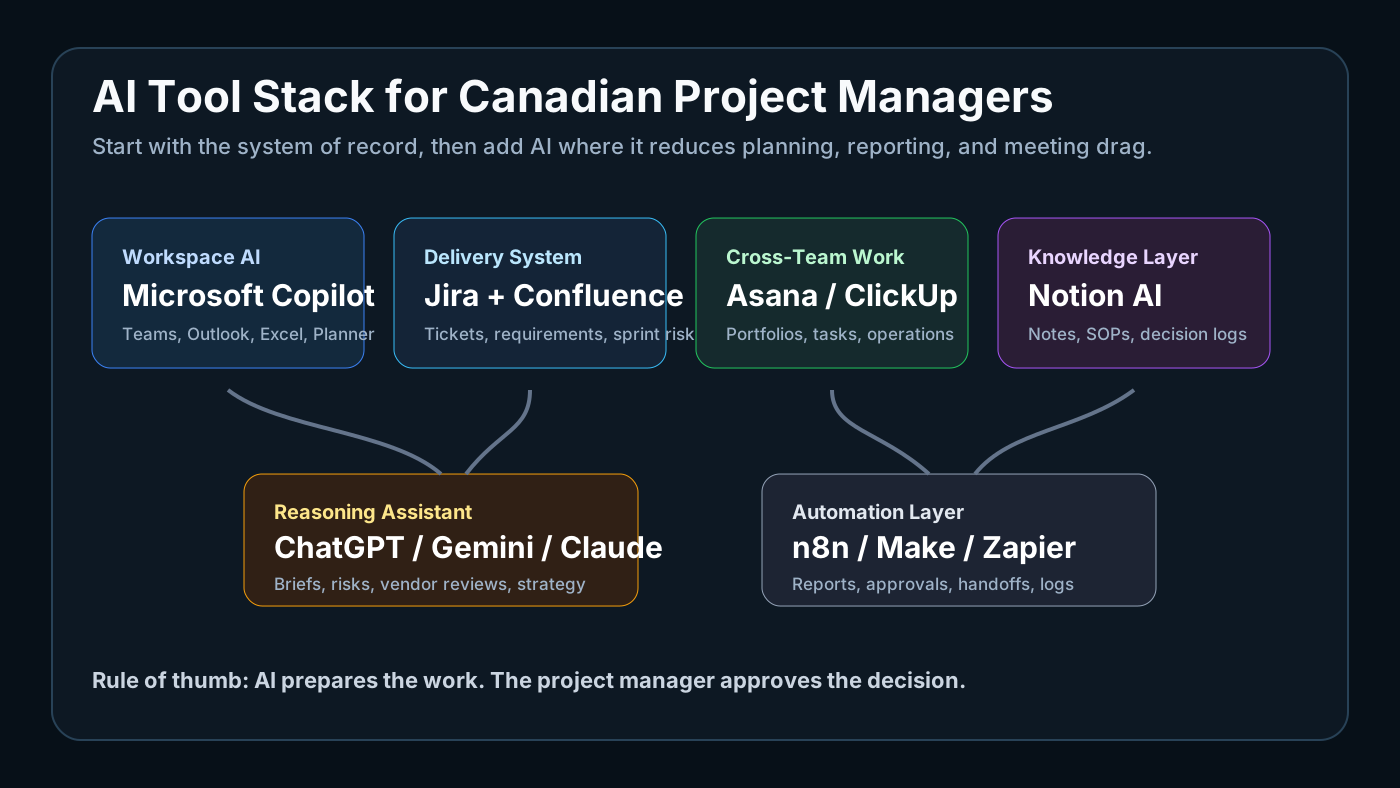
Best AI tools by use case
| Need | Best fit | Why it works | Watch out for |
|---|---|---|---|
| Microsoft-heavy project teams | Microsoft Copilot | Works inside Teams, Outlook, Excel, Word, SharePoint, and Planner | Permission hygiene matters |
| IT service delivery and software projects | Atlassian Intelligence | Strong fit for Jira tickets, Confluence docs, requirements, blockers, and sprint summaries | Bad Jira hygiene creates bad AI summaries |
| Cross-functional portfolio visibility | Asana AI | Useful for status summaries, blockers, goals, and executive views | Needs clean fields and ownership |
| Small teams and agencies | ClickUp AI | Lower-cost all-in-one tasks, docs, dashboards, and SOPs | Easy to over-customize |
| Documentation-heavy teams | Notion AI | Best for notes, decision logs, handoffs, and internal knowledge bases | Not a full delivery system by itself |
| Strategy and writing | ChatGPT, Gemini, or Claude | Good for risk reviews, stakeholder briefs, vendor comparisons, and planning | Keep sensitive data out unless approved |
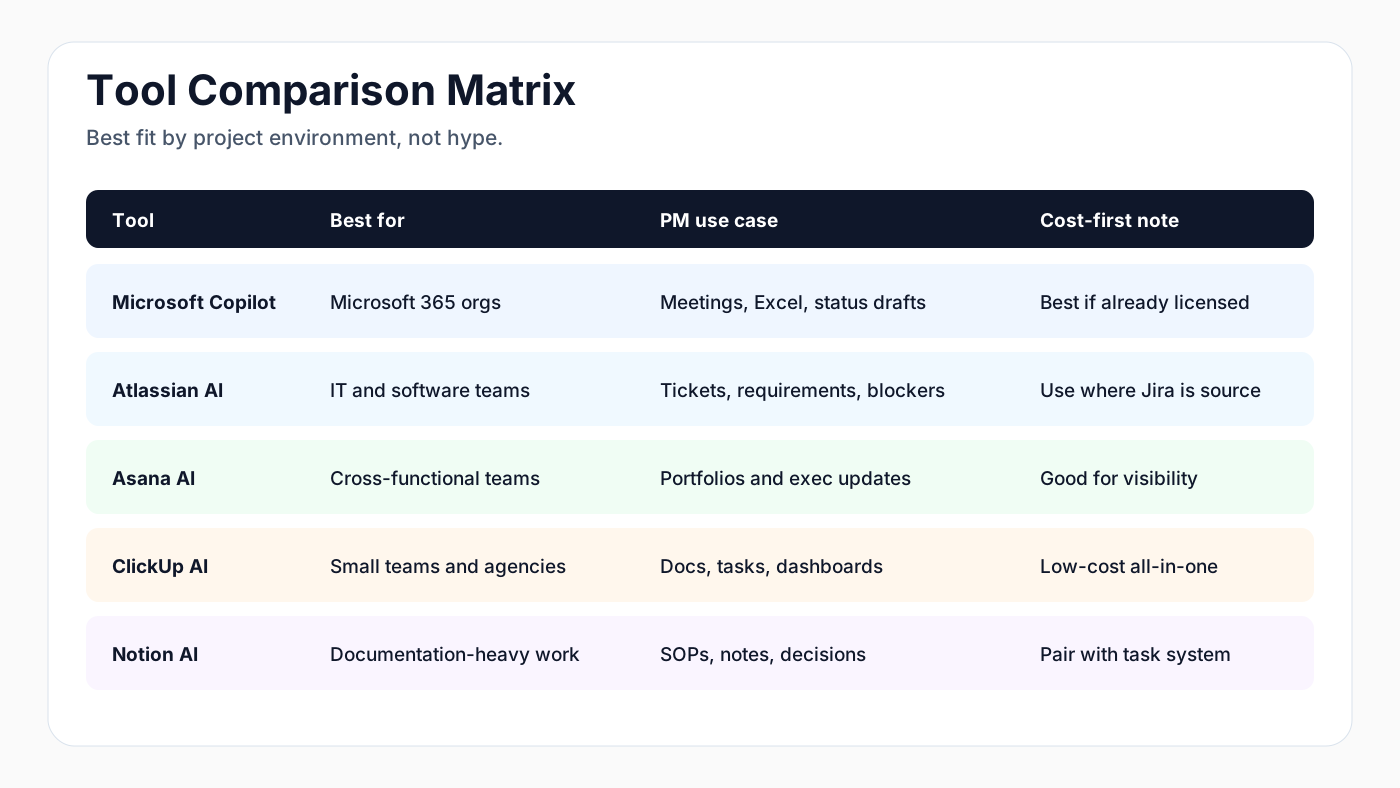
Recommended stacks
For most Canadian PMs, do not buy every AI tool. Pick one stack based on the team's operating system.
| Team type | Recommended stack |
|---|---|
| Microsoft-based company | Microsoft Copilot, Planner or Project, Teams, SharePoint, Power Automate |
| IT or software team | Jira, Confluence, Atlassian Intelligence, GitHub Copilot, one approved reasoning assistant |
| Small agency or consulting team | ClickUp or Asana, Notion, Google Workspace or Microsoft 365, n8n or Make |
| Solo project manager | Notion or ClickUp, Google Workspace, ChatGPT or Gemini, Canva, n8n |
Why AI matters for project managers in Canada now
AI adoption in Canadian workplaces is no longer experimental. KPMG Canada's 2025 Generative AI Adoption Index reported that 51% of Canadian employees use generative AI at work, up from 46% in 2024. Statistics Canada also reported that AI use by Canadian businesses is growing, especially in knowledge-heavy sectors such as professional services, finance, insurance, and information industries.
For project managers, the opportunity is simple: AI can prepare the work, but the PM still owns the decision. That distinction matters. AI should help draft project briefs, convert notes into action items, compare risks, summarize status, and build first-pass timelines. It should not silently approve scope changes, send sensitive client updates, or make hiring, legal, security, or budget decisions without a human review.
The short list: best AI tools for Canadian project managers
1. Microsoft Copilot for Microsoft 365
Best for: organizations already using Teams, Outlook, Word, Excel, SharePoint, and Planner.
Microsoft Copilot is the most practical starting point for many Canadian project teams because it works inside the tools they already use. A project manager can use it to summarize Teams meetings, draft stakeholder updates, pull decisions from long threads, create first-pass project documents, and analyze Excel-based trackers.
Use it for:
- Weekly status update drafts
- Meeting summaries and action items
- Project brief outlines
- Risk and issue log cleanup
- Excel analysis for budgets, dates, and capacity
Watch out for:
- Permission hygiene in SharePoint and Teams
- Sensitive client data in prompts
- Over-trusting summaries without checking source material
Verdict: best default choice for Canadian organizations already standardized on Microsoft.
2. Atlassian Intelligence for Jira and Confluence
Best for: software, IT, product, and service delivery teams.
Atlassian Intelligence is useful when delivery work already lives in Jira and documentation lives in Confluence. It can summarize issues, draft pages, generate action items, help write acceptance criteria, and make long project spaces easier to navigate.
Use it for:
- Turning rough requirements into ticket drafts
- Summarizing sprint or project progress
- Drafting acceptance criteria
- Creating Confluence project pages
- Explaining dependencies across Jira work
Watch out for:
- Messy Jira hygiene, because AI inherits bad structure
- Duplicate ticket creation
- Teams using AI summaries instead of reading critical requirements
Verdict: best choice for Canadian IT and software teams that already run Jira.
3. Asana AI
Best for: cross-functional project management, marketing, operations, and executive visibility.
Asana AI is strong for teams that need clarity across workstreams, not just engineering tickets. It helps summarize project status, identify blockers, draft updates, and make portfolio-level work easier to scan.
Use it for:
- Executive-ready project updates
- Workstream summaries
- Blocker detection
- Goal and project status drafting
- Cross-team accountability
Watch out for:
- Too many custom fields with unclear meaning
- Teams replacing project discipline with AI-written status
Verdict: best for business and operations PMs who need clean status visibility.
4. ClickUp AI
Best for: smaller teams that want tasks, docs, whiteboards, and AI in one lower-cost workspace.
ClickUp is attractive for solo operators, agencies, and small Canadian teams because it combines task management, docs, dashboards, and AI writing support. It can be more flexible than enterprise platforms, but that flexibility needs structure.
Use it for:
- Drafting SOPs
- Turning notes into task lists
- Building simple project dashboards
- Creating reusable project templates
- Summarizing client work
Watch out for:
- Workspace sprawl
- Over-customization
- Inconsistent naming conventions
Verdict: best lower-cost all-in-one option for small teams.
5. Notion AI
Best for: documentation-heavy project teams and lightweight knowledge bases.
Notion AI works well when the main project pain is scattered documentation. It can summarize pages, draft plans, rewrite rough notes, and help create internal project knowledge bases.
Use it for:
- Project charters
- Decision logs
- Meeting notes
- SOPs and handoff documents
- Research summaries
Watch out for:
- Weak task governance if Notion becomes the only project system
- Access controls for sensitive internal pages
Verdict: best for project documentation and knowledge capture, not as the only delivery system for complex teams.
6. ChatGPT Team, Claude Team, or Gemini for Workspace
Best for: research, strategy, writing, planning, and independent reasoning.
Project managers still need a general AI assistant outside the task system. Use a cloud model for thinking work: draft a stakeholder map, pressure-test a project plan, create a risk register, compare vendor proposals, or turn a messy transcript into a clean decision brief.
Cost-first guidance:
- Use Gemini if your company is already in Google Workspace.
- Use ChatGPT Team when you want a strong general assistant and broad workflow support.
- Use Claude when long documents, policy reviews, and careful writing matter most.
- Use OpenRouter when you want model choice and tight cost control, but only if your team can manage API usage and data rules.
Verdict: use one general assistant, not five. Make the team standard clear.
Recommended stack by team type
For a Microsoft-based Canadian company:
- Microsoft Copilot for everyday work
- Planner or Project for schedules
- Teams for meetings
- Power Automate for simple approvals
- ChatGPT Team or Claude only for specialized reasoning if approved
For an IT or software delivery team:
- Jira and Confluence with Atlassian Intelligence
- Slack or Teams summaries
- GitHub Copilot for engineering teams
- ChatGPT Team or Claude for project briefs and risk analysis
For a small agency or consulting team:
- ClickUp or Asana
- Notion for documentation
- Google Workspace or Microsoft 365
- Make, Zapier, or n8n for automation
- One approved AI assistant for writing and research
For a solo project manager or freelancer:
- Notion or ClickUp
- Google Workspace
- ChatGPT Plus or Gemini Advanced
- Canva for visuals
- n8n for repeatable reporting automations
The Canadian privacy and governance checklist
Before rolling AI into project management, set rules that are boring and useful:
- Do not paste confidential client data into unapproved public tools.
- Keep human approval for budget, legal, HR, security, and client-facing decisions.
- Use company accounts, not personal AI accounts, for company work.
- Check AI summaries against the source before sending them.
- Keep an AI usage log for recurring automations.
- Define which data can be used, which data cannot, and who can approve exceptions.
- Review vendor data processing terms before using AI on regulated or client-sensitive work.
This is especially important for Canadian organizations working with public sector clients, healthcare, finance, education, legal services, or cross-border data.
A simple AI workflow for weekly project reporting
Start with one repeatable workflow:
- Collect updates from Jira, Asana, ClickUp, Planner, or a shared sheet.
- Ask AI to summarize completed work, blockers, risks, and next steps.
- Have the PM review every claim against source data.
- Generate two versions: executive summary and delivery-team detail.
- Send only after human approval.
- Save the final report in the project record.
This single workflow can save hours without creating a risky autonomous system.
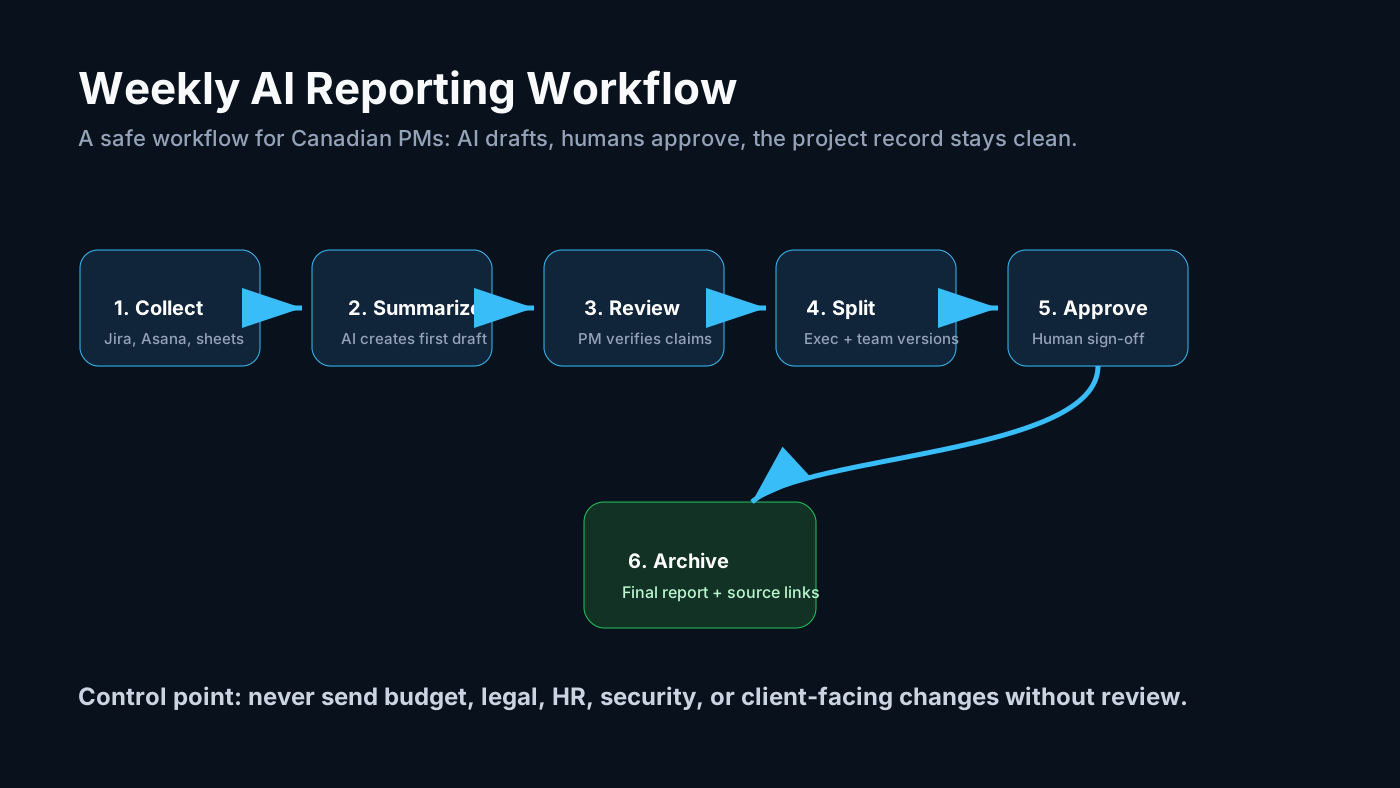
Use this as the first automation target before trying anything more advanced. It is low risk, easy to review, and gives the project manager measurable time back every week.
Final recommendation
The best AI tool for Canadian project managers is usually the one already connected to the team's real work. If your company runs on Microsoft, start with Copilot. If delivery runs on Jira, start with Atlassian Intelligence. If the team is cross-functional, Asana is strong. If budget matters most, ClickUp and Notion can carry a lean stack.
Do not buy AI because it sounds advanced. Buy it where it removes project friction: meetings, updates, risk tracking, documentation, stakeholder communication, and repeatable reporting. The winning setup is small, governed, and measurable.
FAQ
What is the best AI tool for project managers in Canada?
For Microsoft-based teams, Microsoft Copilot is usually the best starting point. For IT and software delivery teams, Atlassian Intelligence is often the best fit because Jira and Confluence already hold the project context.
Should project managers use ChatGPT for client work?
Only with approved company accounts and clear data rules. Do not paste confidential client data, contract details, HR issues, or security information into unapproved AI tools.
What is the lowest-cost AI stack for a small Canadian team?
A lean stack is ClickUp or Notion for work management, Google Workspace or Microsoft 365 for documents, ChatGPT/Gemini for reasoning, Canva for visuals, and n8n for reporting automation.
Sources
- Project Management Institute, Pulse of the Profession 2025:
- KPMG Canada, Generative AI Adoption Index 2025:
- KPMG Canada, Beyond AI adoption, 2026:
- Statistics Canada, Analysis on artificial intelligence use by businesses in Canada, second quarter of 2025:
- Microsoft Canada, 2025 SMB AI adoption report:
- Microsoft Copilot for Microsoft 365:
- Atlassian Intelligence:
- Asana AI:
- ClickUp AI:
- Notion AI:
Advertisement